Pitufino
the next-generation navdata gateway!
Autumn Refit Promo: 15% off on Pitufino V1.2 models! In our online shop. Valid until Oct. 31.
New Feature: Cloud Access
Cloud Access lets you keep an eye on your boat from anywhere with Internet access. Use Pitufino's Anchor-Watch app while you're ashore and on the way back from the restaurant to the bay that filled up with other boats, toggle your anchor light to find yours amidst the sea of lights. While your boat is in the marina, monitor your batteries and bilge alarms from home and receive notifications when alarms get triggered.
Cloud Access not only gives you real-time access to your Pitufino, but you can store position reports, logbook entries and soon many other useful data (such as battery stats, weather, or sailing performance) into our database. Thus providing tracking and fleet-control services, and soon more such as logbook management and polar-diagram creation. NEW: automatically update your boat position on noforeignland.com!
Cloud Access requires your Pitufino to be connected to a router with Internet access, that can be for example a router with SIM card, a router that bridges to your Marina's Wi-Fi, the hotspot of a mobile phone and for offshore use Starlink or Iridium Go (a VPN is not required).
The new Pitufino model is here!
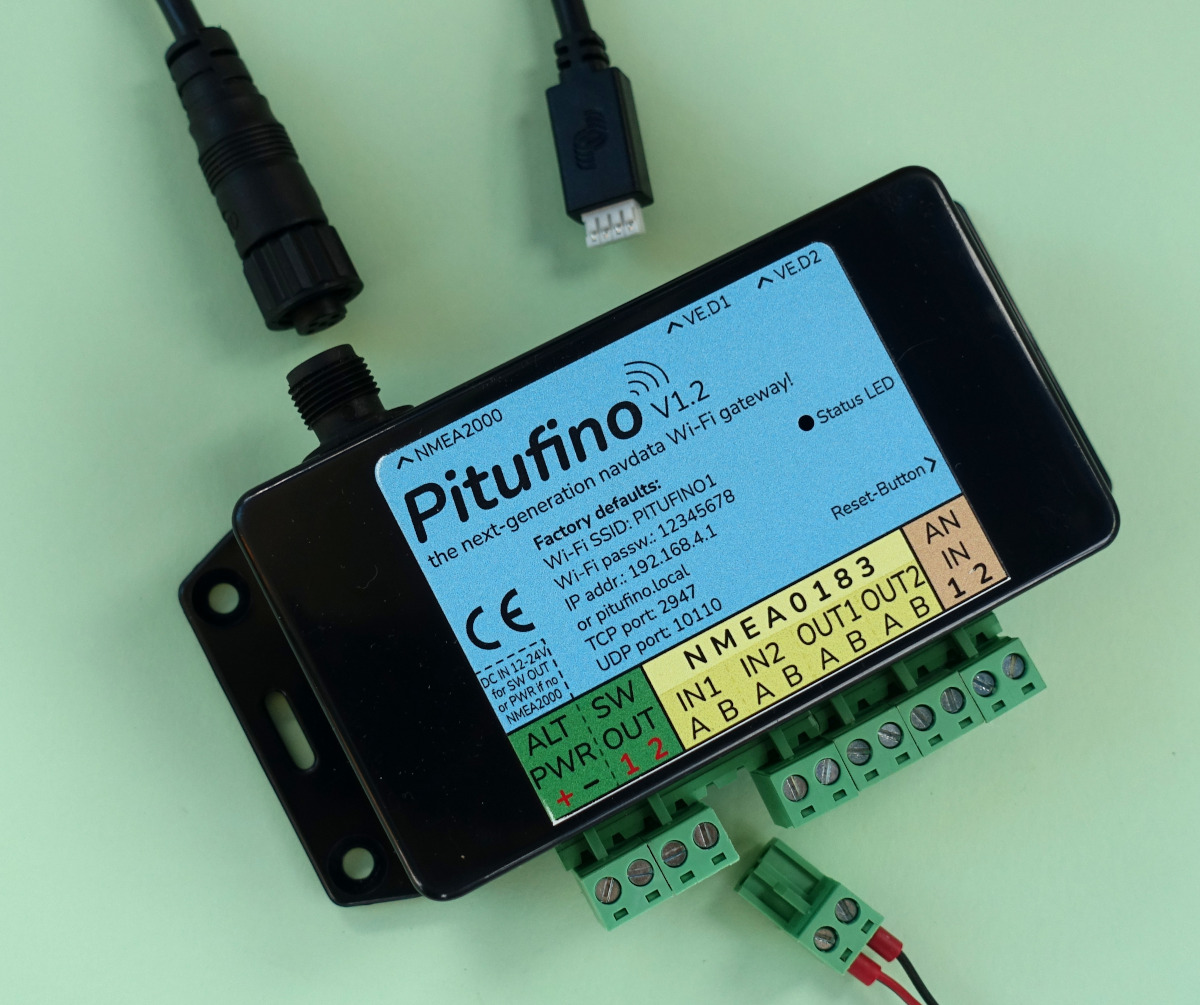
In addition to all the features of our old model, V1.2 is fitted with an NMEA2000 connector (for standard micro-C cable), two VE.Direct ports for Victron battery monitors/smart shunts or solar chargers, two switched outputs (1 Amp each) for eihter an external alarm horn or for switching anything else on your boat per Pitufino app, two analog inputs for measuring voltages and/or triggering alarms and it has got a larger CPU memory.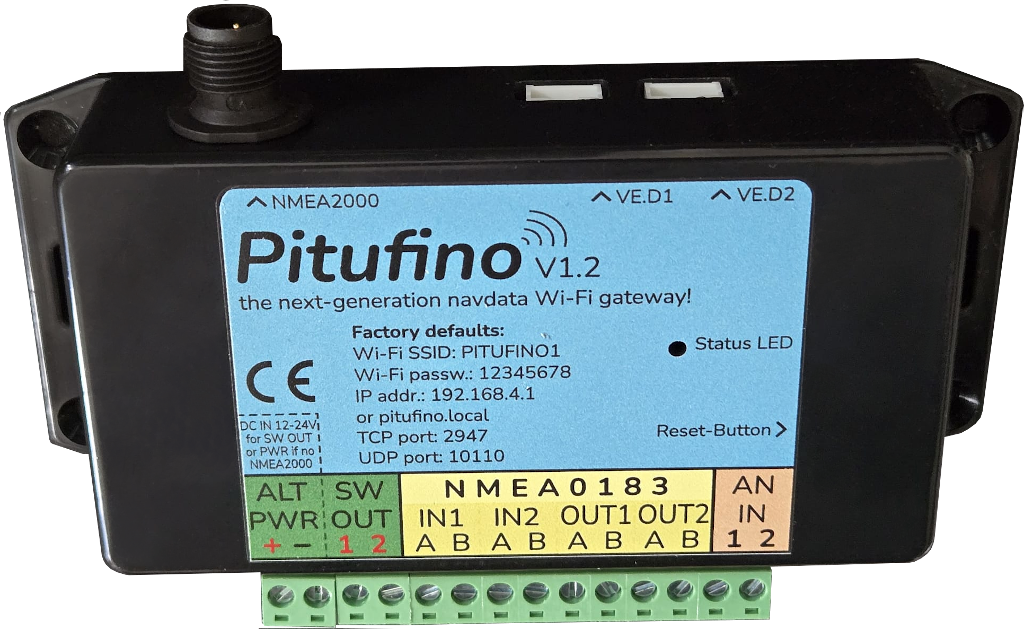
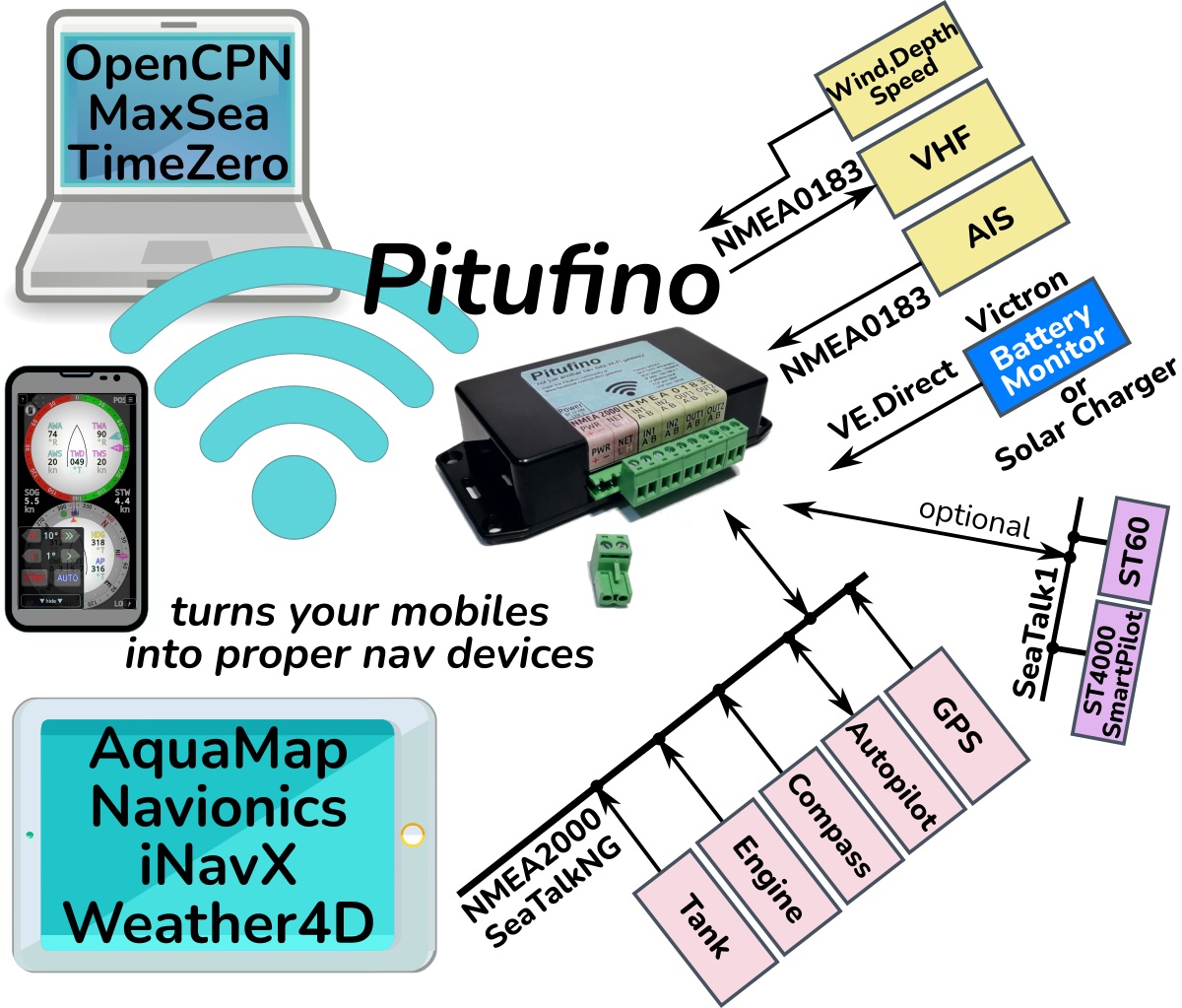
Pitufino not just sends GPS, AIS and instrument data from your boat's nav devices to your favourite chart-plotter apps, but...
...also comes with sophisticated apps that run in your browser (these don't even need to be installed).
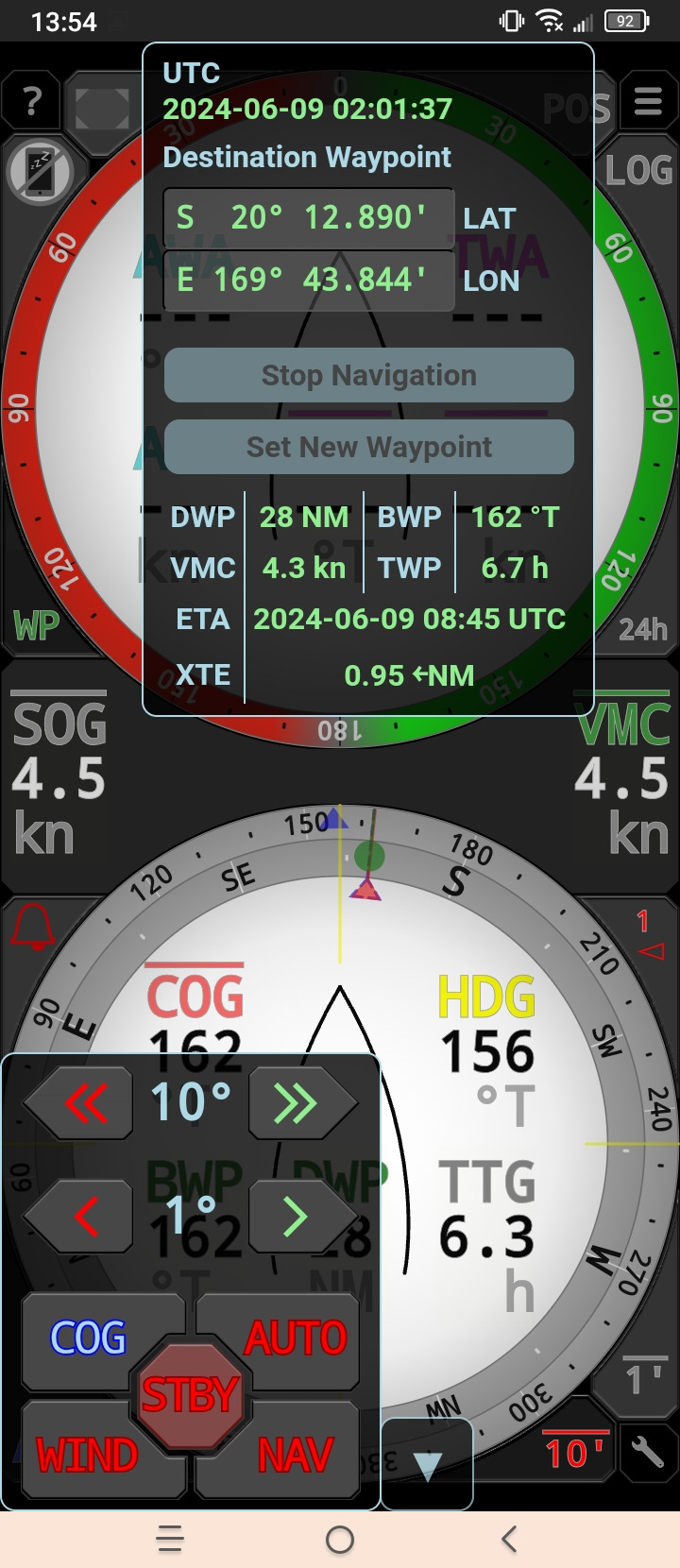
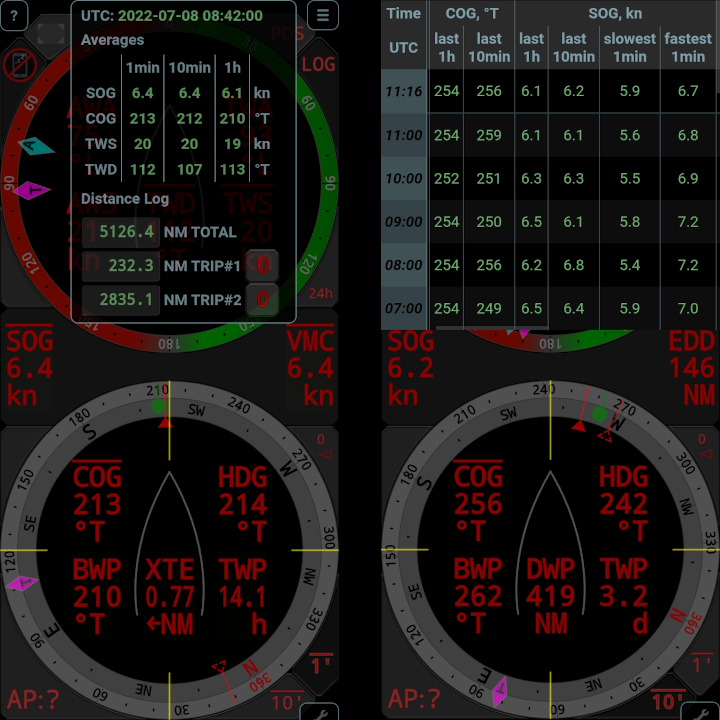
The Sailing Instruments app includes an auto-pilot controller and shows all data relevant for sailing, including waypoint data, polar targets, laylines, AIS targets, long-term averages and logbook (here in night colors).
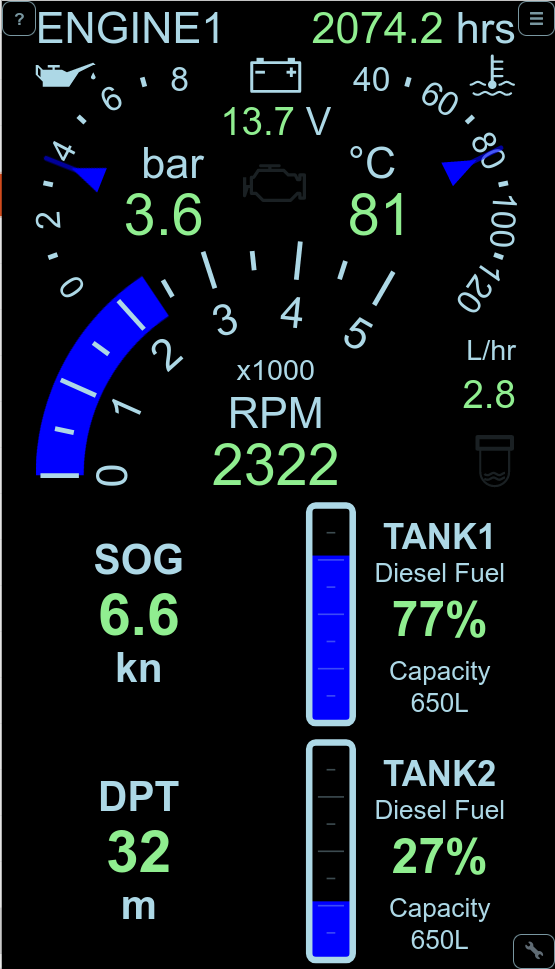
The Multi Display app lets you create your fully customized instrument view, including engine dashboards, tank, battery and charger displays, or...
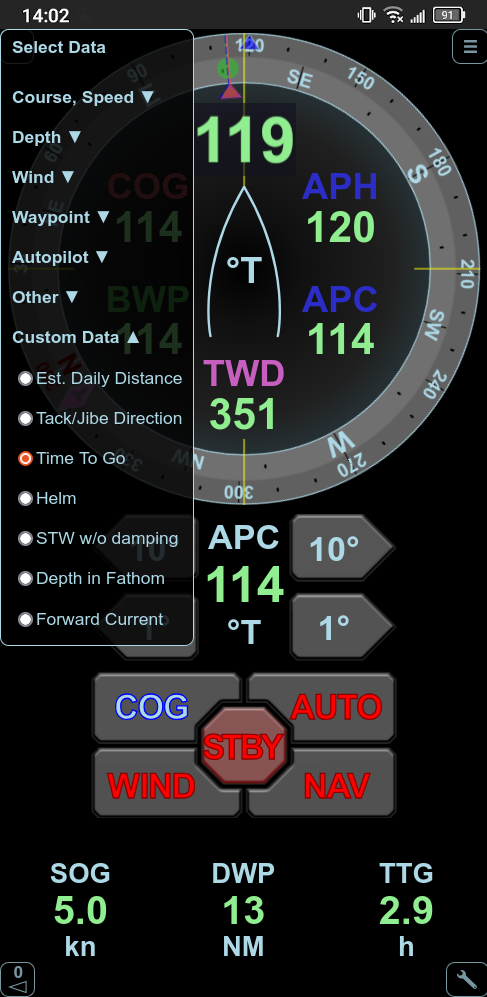
...for instance a dedicated auto-pilot remote control that includes a hold-COG (no-drift) mode.
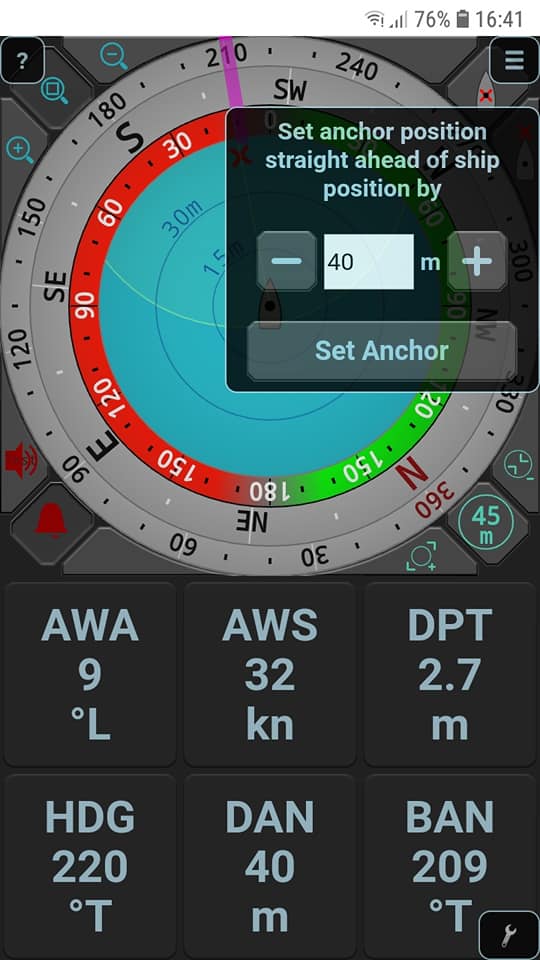
The Anchor Watch app is a dedicated instrument view for times at anchor, including an anchor alarm and a rotation counter.
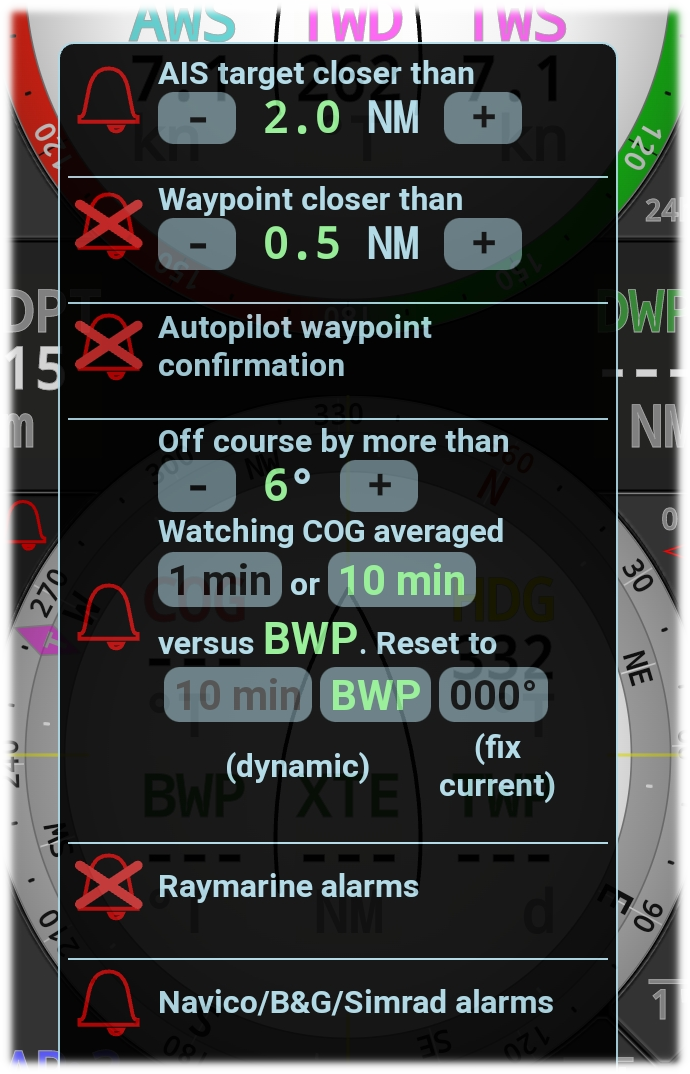
Pitufino's alarm system also integrates NMEA2000 alarms sent from Raymarine and Navico (Simrad, B&G, ...) devices and allows to confirm them in the apps.
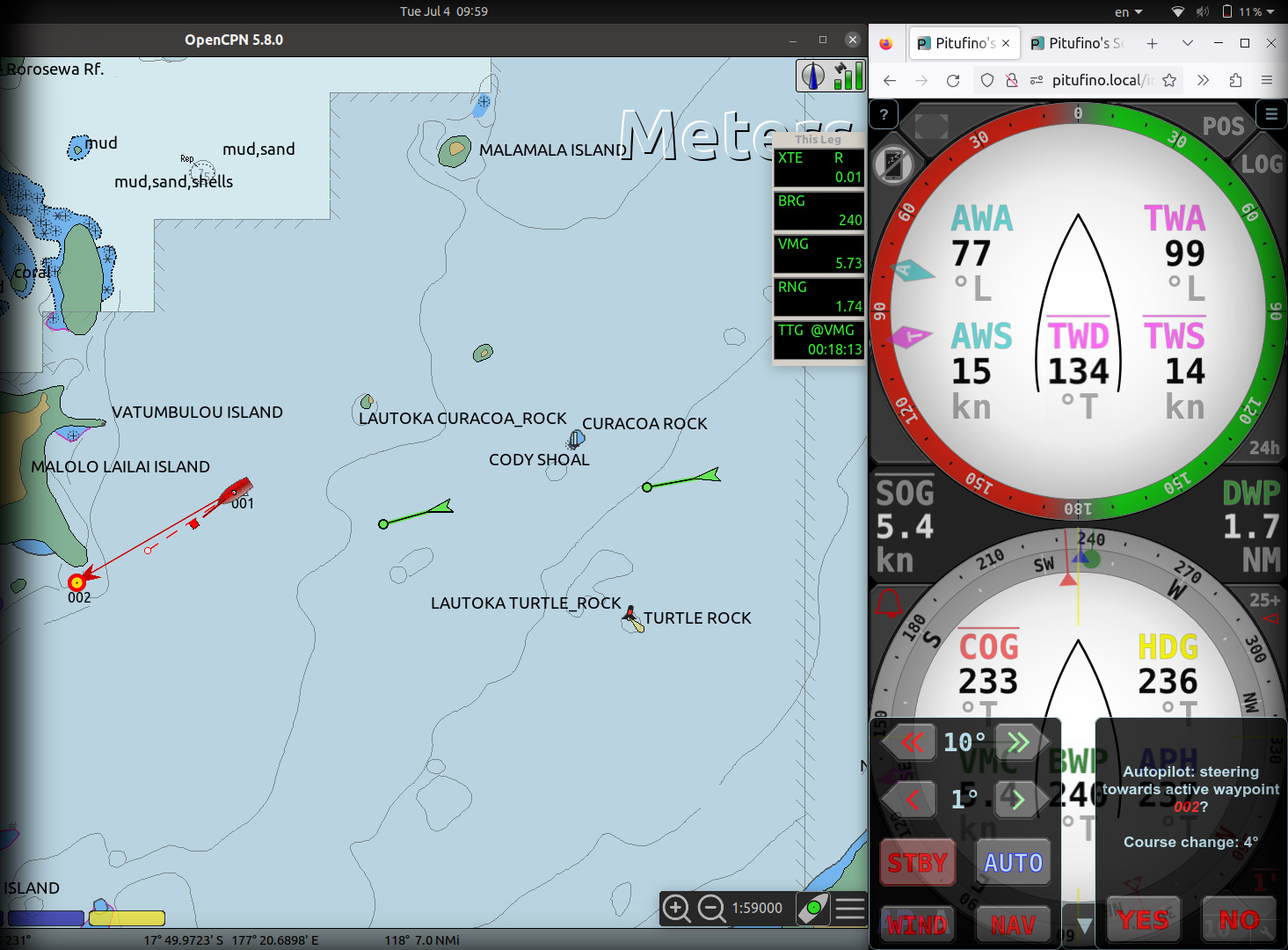
Pitufino serving data to OpenCPN and Sailing Instruments side by side. Here the pilot has just been switched to NAV mode to steer to OpenCPN's active waypoint.
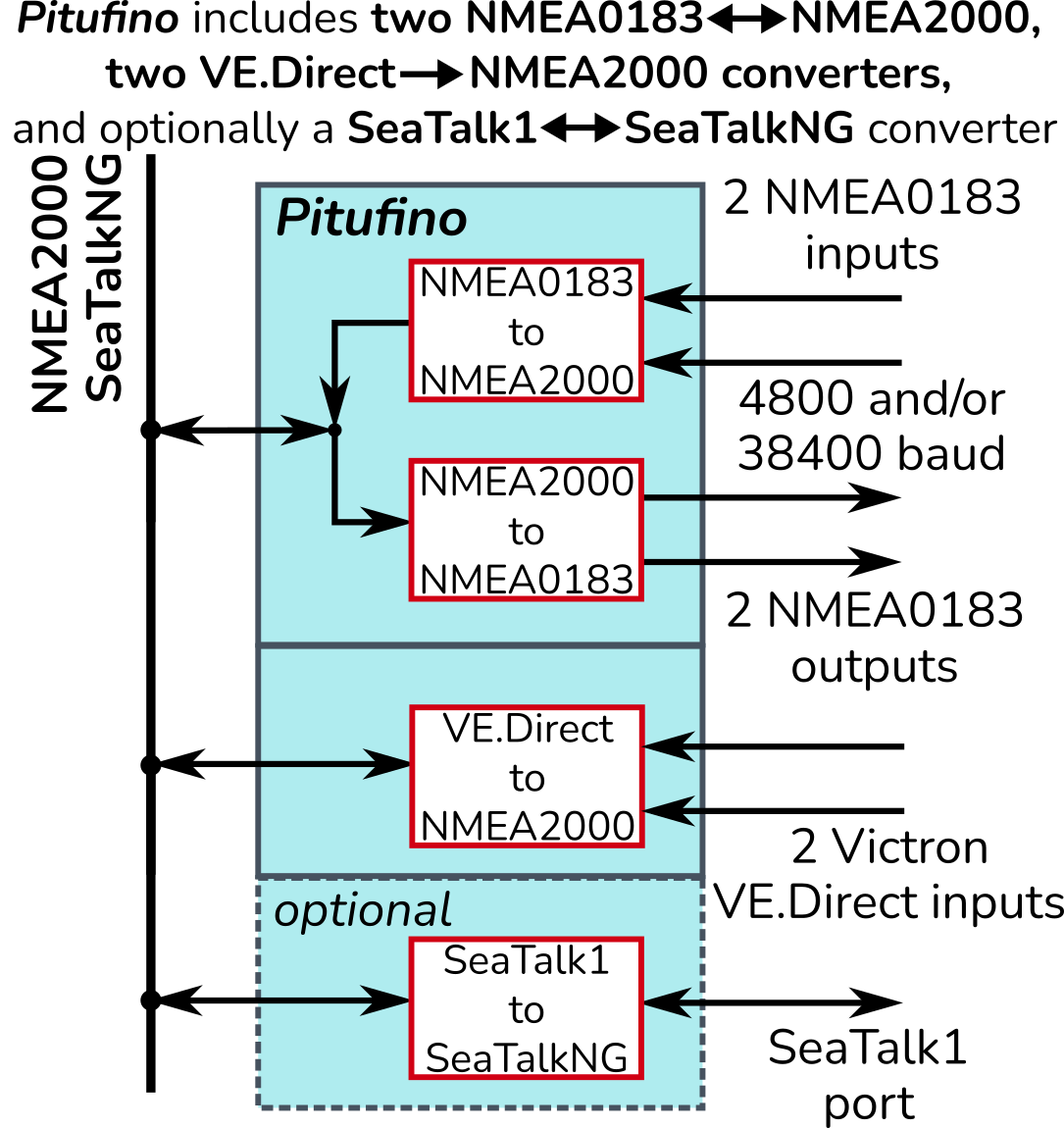
With Pitufino you don't need any other NMEA or SeaTalk converters any more.
Why would you want a Pitufino?
Pitufino integrates so many functions, so there are plenty of reasons:
You might want to use Pitufino just as a black box to
- benefit from Pitufino's dynamic data source selection also on your devices on NMEA2000, NMEA0183 or SeaTalk as well as in all your WiFi-connected apps to always get data from your preferred sources in different scenarios (some devices may be switched off sometimes)
- use Pitufino's turn-compensated damping for wind and course on any device or app to get stable readings (and a stable projected-course line) that still react to steering/course changes instantly
- use Pitufino as an alarm repeater for Raymarine or B&G devices or NMEA2000 engine sensors (Pitufino has a loud buzzer and options to connect an external horn)
- simply convert data from older devices (NMEA0183 or SeaTalk1) to NMEA2000 or the other way round or from Victron VE.Direct to NMEA2000
- multiplex and send data to navigation or chart-plotter apps via WiFi (TCP or UDP)
- fix incompatibilities and other problems (such as the GPS date rollover) with old devices
or you might like to use Pitufino with its feature-rich web apps as a web display, that
- combines all nav instruments clearly and accessibly, including AIS list, waypoint and other nav data, so you can keep an eye on the sailing situation from anywhere on the boat
- shows engine dashboard, tank levels, battery monitors or solar chargers (connect Victron devices per VE.Direct!), so you have all boat data in one place
- lets you control your autopilot (adjust course or change mode per app)
- adds a no-drift mode (hold course over ground) to your pilot which is helpful in situations with a varying current or leeway
- lets you switch other devices per app (digital outputs)
- creates log-book entries with statistics on progress and weather
- provides long-term averages that reflect sailing performance and wind trends
- provides anchor watch and other useful alarms
- lets you copy-and-paste waypoint data from Navionics app (or others) and makes it available on your nav networks to guide the helmsperson or autopilot
or you might want to use Pitufino as a platform for remote monitoring and tracking via Cloud Access to
- use the anchor watch app from ashore
- monitor alarms and other boat data (batteries, chargers, temperature, etc.) or switch devices on the boat on or off from home
- receive notifications when alarms get triggered
- collect your logbook and tracks in a database
- automatically update your boat position on noforeignland.com
The list is long (and gets constantly longer), but maybe just one reason is enough for you to get a Pitufino!
Pitufino
a real alternative to expensive chart plotters!
Modern chart plotters now typically provide a Wi-Fi connection to feed their accompanying screen-mirroring apps on mobile devices. Such an app lets you handle your plotter and view your instrument data remotely. If you want to add such a convenience to your boat without spending several thousand bucks on a new plotter, a Pitufino gateway is the ideal alternative.
Gateways are little blackboxes that are connected to your navigation instruments and send nav data to a local Wi-Fi network. With a gateway you can use the chart-plotter software of your choice on a laptop or tablet PC, popular ones are MaxSea/TimeZero, OpenCPN, Navionics, iSailor, iNavX or Weather4D among many others. Of course one can run such an app on a tablet or phone without a gateway by using the built-in GPS of the mobile device, however you won't see other ships' positions (AIS targets) nor your depth, compass or wind data.
Pitufino not only relays the nav data but additionally provides its own: it computes ground-referenced true wind (which incorporates leeway/drift), sends wind and course data with optional damping (for more stable readings in a rough sea), computes magnetic variation from its built-in magnetic model (always up-to-date) and takes over the calculation of waypoint data (such as the cross-track error which your pilot needs in waypoint mode) when your plotter app cannot provide this data fast enough (due to network glitches, delays or app hangs) or the app goes offline (you can even switch off your mobile device during legs without navigational hazards and still get updated waypoint data!) or when your app cannot send data to the network at all (e.g. Navionics Boating).
The Pitufino gateway comes with its own sophisticated apps to display instrument data in real time. Those apps don't even need to be installed or downloaded, they are served on the local network and simply run in your browser. The Sailing Instruments app for example shows all data relevant while sailing and is packed with features ideal for passage makers: long-term averages that properly indicate a wind shift, automatic hourly logbook with statistics, AIS targets, waypoint data, alarms (Pitufino has even a built-in buzzer), estimated tack/jibe course, night colors and more.
A feature unique to Pitufino is that it allows you to remote-control a wide range of popular autopilots. Adjust your course or switch from wind vane to compass mode from your phone! Not even the screen-mirroring apps of new plotters have this feature. Furthermore, Pitufino adds a hold-COG (no-drift) mode to all supported pilots in which the course is continuously adjusted for a varying leeway/drift.
Pitufino wasn't developed in an office far away from the sea, but onboard the S/Y Pitufa while cruising. Therefore many ideas for features were born and incorporated during long passages and the development continually goes on, also including the feedback and wishes of other Pitufino users.
Also available:
Pitufino ST with integrated Seatalk module
Connect Pitufino directly (without a Seatalk-to-SeatalkNG converter) to old Seatalk devices and control your old Raymarine/Autohelm pilot! Plus, you can connect an external alarm siren or strobe light or use the relay to switch other devices per app.
The Seatalk module is also available separately if you want to upgrade your Pitufino V1.0 or V1.1.
Visit our online shop.
Where to get Pitufino?
Visit our online shop to order.
Our distributor for France: Synapse Navigation
Demo devices can be tested at
Marine Mörth (Graz, Austria),
Synapse Navigation (Les Sables d’Olonne, France),
Tahiti Yacht Accessoire (Marina Taina, Tahiti)
and at The Yacht Shop in Fiji.
Learn more about Pitufino
- Power supply 12VDC/24VDC (usually powered by NMEA2000 bus, LEN=3)
- NMEA2000 (SeatalkNG) port
- 2 NMEA0183 inputs (isolated)
- 2 NMEA0183 outputs
- optional isolated SeaTalk1 port (with Seatalk module or Pitufino ST)
- 2 Victron VE.Direct inputs (new firmware supports up to 4 VE.Direct inputs when NMEA0183 is not needed)
- Routing and conversion between those ports and Wi-Fi streams
- 2 analog inputs (can be used as digital inputs as well)
- 2 digital outputs (up to 1A)
- Wi-Fi: provides own access point (with DHCP) or connects to existing Wi-Fi network
- mDNS: gateway can always be found as pitufino.local on iOS, macOS, Linux and newest versions of Window and Android
- NMEA0183 data servers: multiple TCP connections, UDP broadcast, UDP unicast
- Alarm buzzer (from hardware model V1.1 up)
- optional relay output for external alarm buzzer/siren (with Seatalk module or Pitufino ST)
- Repeater (or external alarm) for alarms transmitted over NMEA2000 from Raymarine devices, Navico (Simrad, B&G, ...) devices, and engine sensors
- Internal alarms for depth, wind, anchor drag, close AIS target, waypoint arrival, pilot waypoint confirmation, off course, and more
- Web server (for local intranet): provides browser-based configuration, firmware update, pages (Web-Apps) to view navigation data in real time (sailing instruments, anchor watch, pilot controller, AIS-target list, logbook, engine and tank gauges, battery monitors, ...)
- Pilot controller adds hold-COG mode (no-drift mode) to all supported pilots
- Built-in World Magnetic Model: up-to-date magnetic variation
- Computes ground-referenced true wind and provides wind data and COG/SOG with proper damping to all outputs for other apps and displays. Even with strong damping, COG and wind angle follow course changes without any delay.
- Computes 1min/10min/60min averages for TWD, TWS, COG, SOG and VMC
- Creates hourly logbook entries with averages and other statistics
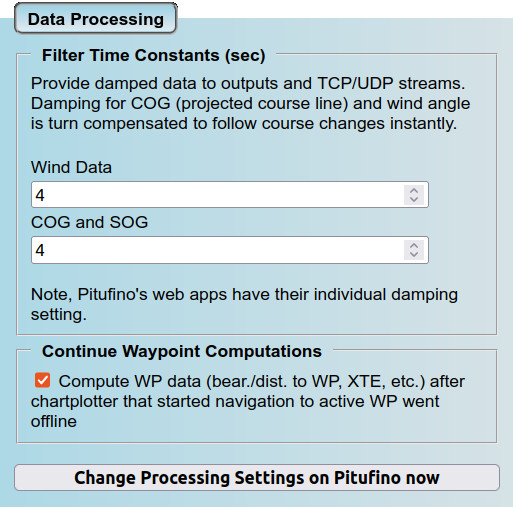
- Computes active-waypoint data for chartplotter apps that cannot send data back to the network (e.g. Navionics Boating) or takes over the computations of waypoint data after the chartplotter (device or software) that started a navigation to the active waypoint (‘Go to’ or ‘active route’) has been switched off or temporarily become unreachable (e.g. bad network)
- Sentence Translator: some devices output deprecated or unusual sentences. Pitufino translates them into well-supported ones. Currently implemented translations add support for Robertson/Simrad Dataline and allow Furuno FA-50 AIS transponders (and others that don't send GPS messages) to be used as GPS sources.
- GPS-date correction on NMEA0183 inputs for older GPS/AIS units suffering from the 1024-week rollover
- Made in Austria
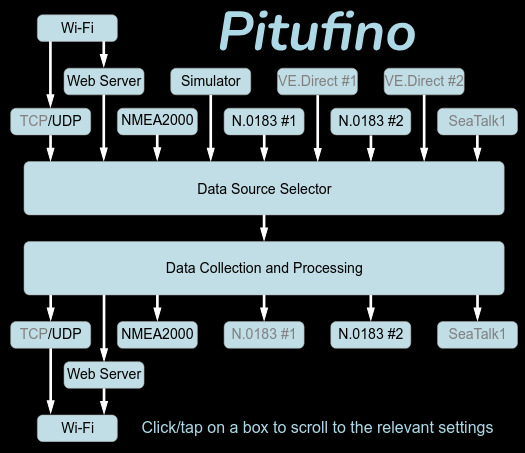
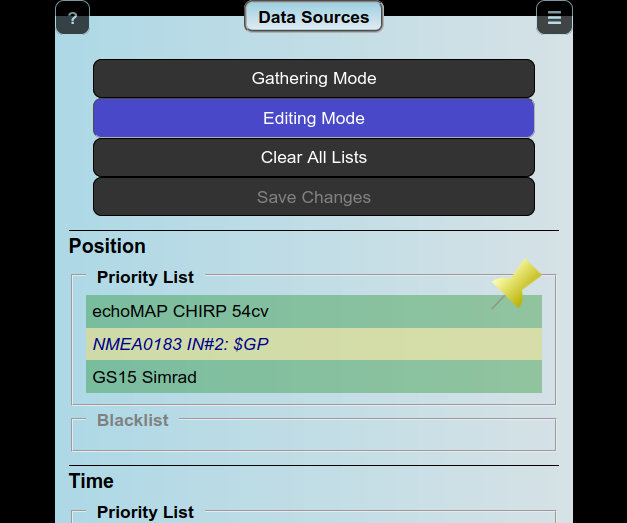
Pitufino's data routing uses a single Data Source Selector for all inputs (wired and wireless) and protocols:
Priority lists to specify your preferred sources and fall-back devices:
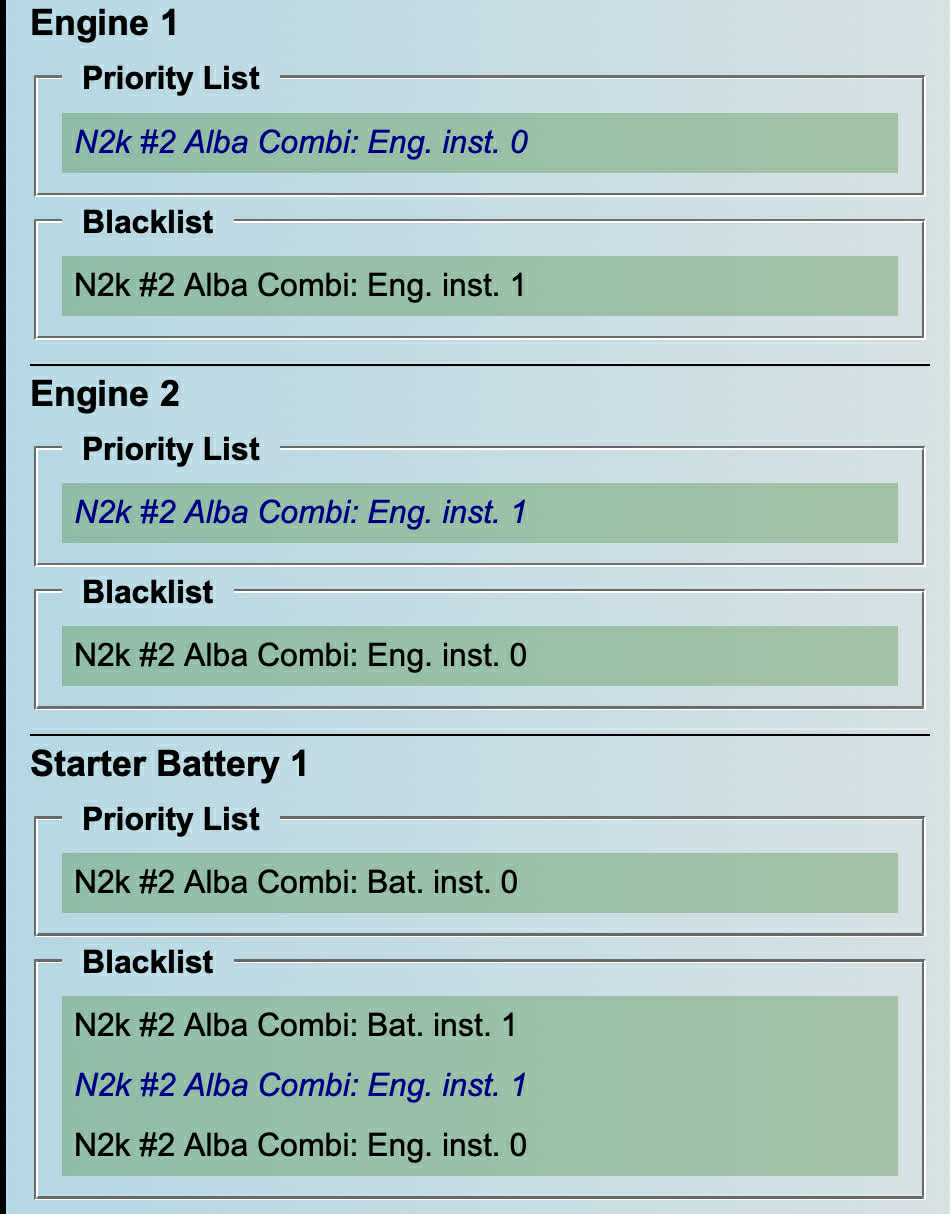
Map sensor instances to display instances:
- Comes preconfigured to allow plug and play in many common scenarios
- Offers a high degree of customization
- Elaborate settings for filtering/routing, multiplexing, and conversion
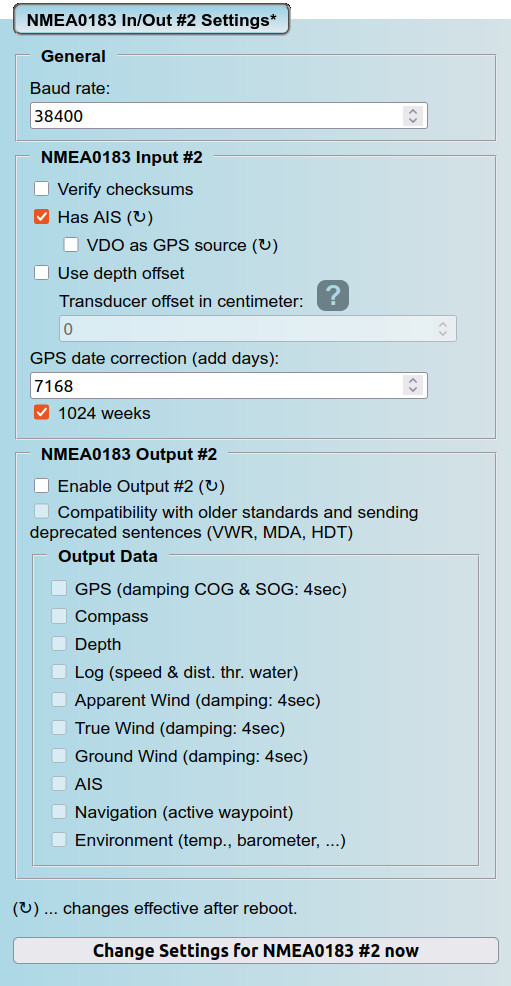
Settings for an NMEA0183 port (example for a connected AIS):
Provide data damping and take over waypoint computation:
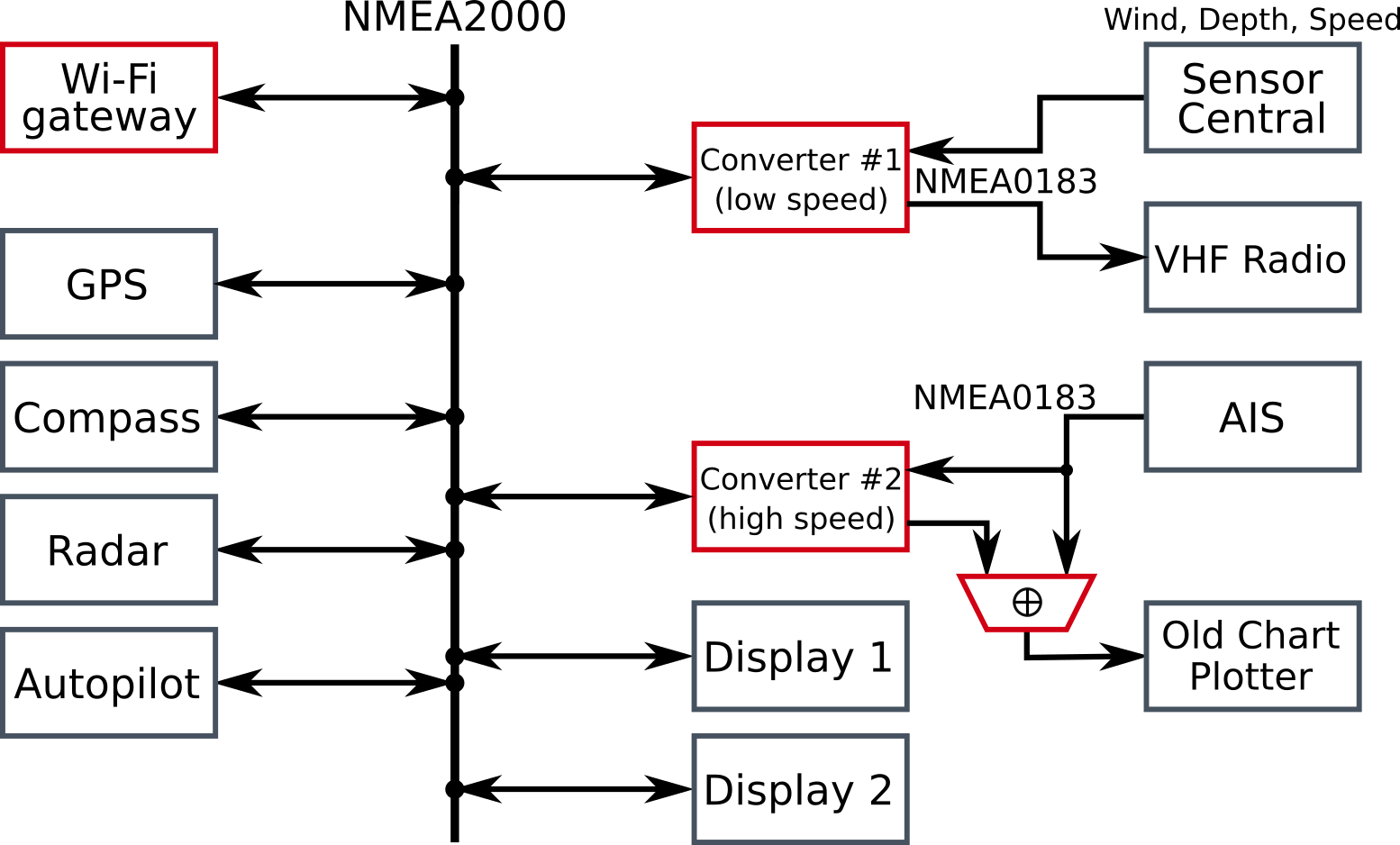
Our cumbersome pre-existing solution aboard Pitufa that needed 4 additional devices:
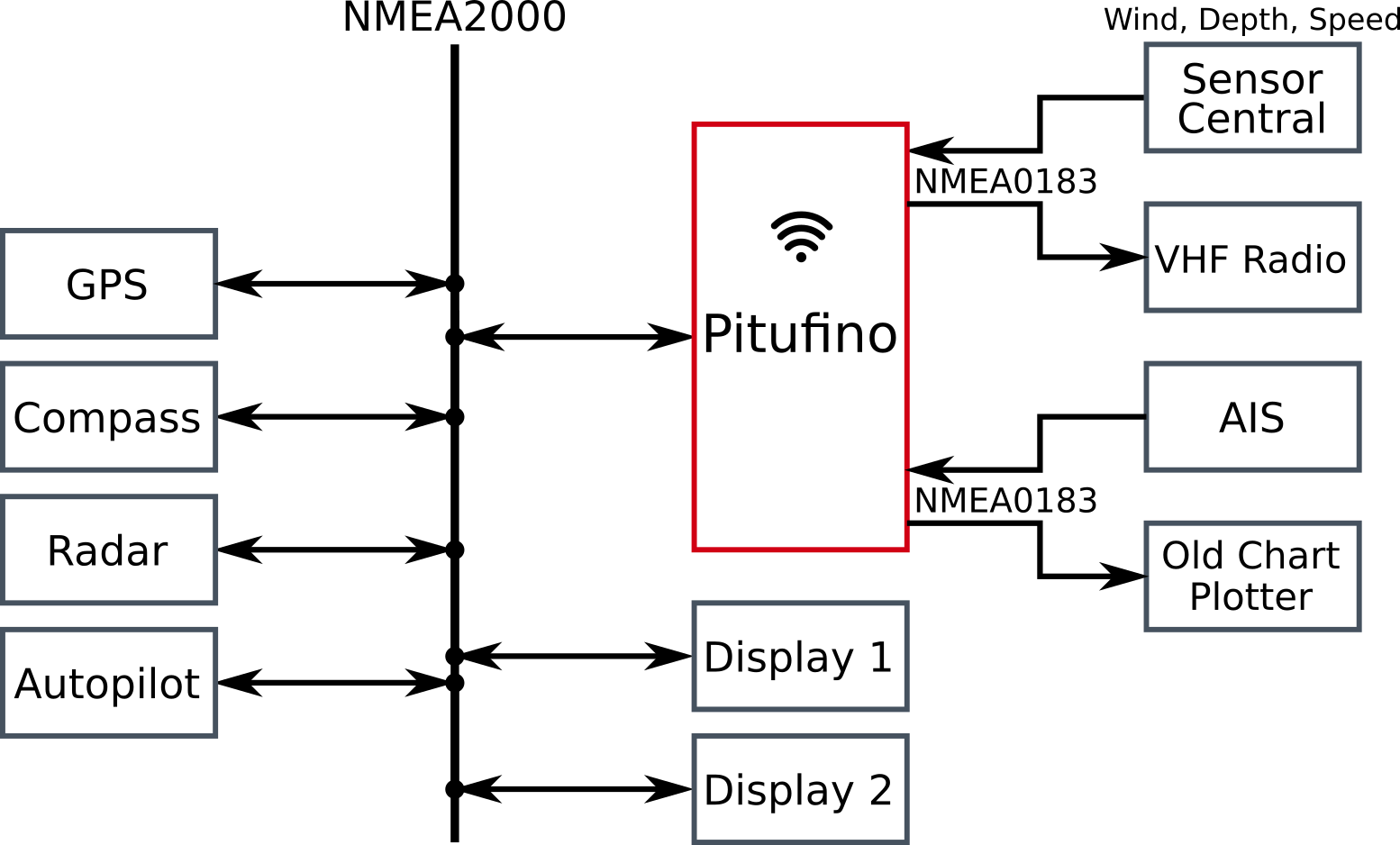
...and the new set-up using a Pitufino:
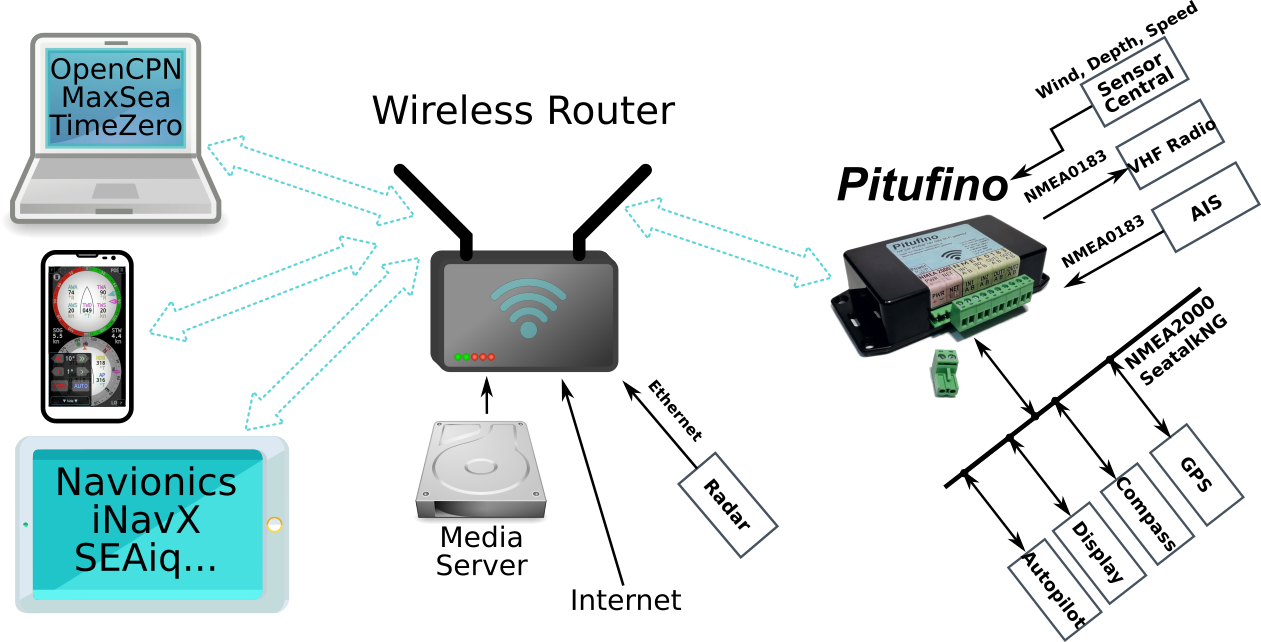
Do you already have a Wi-Wi network on your boat? Simply connect Pitufino to your existing network:
Which autopilots does Pitufino support?
The current firmware supports:
- Raymarine's SeatalkNG/NMEA2000 pilots like Evolution EV-1/2 (note, EV-1 is included in system packs like EV-100/200/300/400) or the older SPX 10/30/Solenoid (when directly connected to SeatalkNG)
- NMEA2000 pilots from Navico/Simrad/B&G like NAC-3/NAC-2, AC42/AC12 or H5000
- Garmin's Reactor NMEA2000 pilots
- Pitufinos with the SeaTalk1 module (ST models) can control all older Raymarine/Autohelm SeaTalk1 pilots like the SmartPilot S series (and X series that is used together with a SeaTalk1 control unit like ST6000)
Pitufino adds a hold-COG (no-drift) mode to all supported pilots. In this mode Pitufino adjusts the pilot heading to compensate for varying drift/leeway.
User and Installation Manual
The user manual (English) can be downloaded as a pdf file. If you are searching for info on older hardware versions and/or the V1.5.x firmware, downloaded the old version.
User Manual in German: download pdf.
User Manual in French: download pdf.
Installation Manual for the SeaTalk Module (English)
Planned features for upcoming firmware versions
Pitufino is under active development to include new features and to extend its range of applications even wider. On our to-do list are
- more Cloud Access applications
- data gathering to create polar diagrams (only on V1.2 models)
- more sailing processor features (filters, corrections, ...)
- more web instruments, better logbook assistant, more alarms, etc.
- support for more proprietary and deprecated sentences
- support for more autopilots
- and more sentence translations. Just tell us what nav devices you have and we will figure out a way to make them talk to each other!

Latest Firmware: V1.6.5 (released 2026/9/6)
Firmware V1.6.x brings major changes and improvements compared to V1.5.x, such as
- Cloud Access and remote monitoring,
- ultra fast booting,
- easier configuration,
- simpler and uniform navdata routing and
- uniform data source selection with priorities and blacklists.
Note, 1.6.x versions do not implement direct NMEA0183 routing (via the different NMEA0183 filters), which means that yet unparsed messages such as DSC are not available. If you currently rely on such sentences, you should continue using the V1.5.x firmware.
Version 1.6.x uses a different configuration method, so it does not read your existing V1.5.x settings but starts with factory defaults. However, we provide a settings migrator that should be uploaded to your Pitufino and executed before updating to V1.6.x.
- Download the settings migrator: export.html.gz
- Upload export.html.gz to your Pitufino using its Firmware Update page (enable the module for separate file upload, select export.html.gz under Update HTML Files and click Update).
- Open the settings migrator in your web browser, using for instance http://192.168.4.1/export.html (or whatever address your router has for Pitufino).
- Download the new firmware: Pitufino.Firmware.V1.6.5.zip
- Update the firmware using Pitufino's Firmware Update page (select zip file under Update Firmware).
- After booting the new firmware (with factory defaults and Pitufino's own Wi-Fi), go to Pitufino's Settings page which will offer you to import your old settings.
Changelog for V1.6.x series
Changes since V1.6.4:
- option to have pushbutton on AN1 to silence (and disable) triggered alarms
- fixed http auth timeout problem (bug in 1.6.4)
- adaptive timeout for WP navigation data validity (longer for N0183 sources, shorter for N2k)
- a few smaller improvements
Changes since V1.6.3:
- basic demo mode (simulator)
- relaxed web-app stream handling
- two N2k sources can be selected for raw-data log
- a few smaller improvements
Changes since V1.6.2:
- ST1 pilot mode fix
- new port configuration, up to 4x VE.Direct. Check your settings!
- support for Victron DC-DC chargers (Orion XS models)
- support for 4 chargers
- Multi Display app adds 'Solar Total' view to charger display
- easier debug option per webpage
- N2k can be disabled
- included batteries in stream output
- a few smaller improvements
Changes since V1.6.1:
- more info for N2k devices on Data Sources page
- fixed erratic engine RPM display
- fixed crash after enabling tank output for streams
- fixed N2k battery not showing up when no detailled-status PGN
- N2k battery status PGN also for starter battery
- fixed Seatalk1 output of WP id
- password fields on Settings page got Show/Hide buttons
- a few smaller improvements
Changes since V1.6.0:
- included batteries and chargers for N2k output (-> VE.Direct-to-NMEA2000 conversion)
- re-included tanks and engines for stream output
- fixed TWP when ETA from N2k
- fix for VE.D if BMV has no temperature & fixed displaying Kelvin instead of C
- possibility to unregister from cloud access on Settings page
- fixed wrong HW-version identifier (1.13 instead of 1.2)
- several smaller improvements
Latest 1.5.x Firmware: V1.5.21 (released 2025/08/26)
Download the latest 1.5.x version here.
Changelog for V1.5.x series
Changes since V1.5.20:
- fixed changing to AP mode after reconnection to WLAN failed
- added engine coolant temperature (ECT) as alarm option
- a few minor improvements
Changes since V1.5.19:
- status LED now blinks while initialization after booting and then goes on as soon as either own AP is up or other WLAN has been joined
- changed WLAN reconnection
- removed toggles for Navico & Raymarine alarms from General Settings (use alarm settings in web apps instead)
- moved Expansion-Port Settings to Port Configuration
- new in Expansion-Port Settings -> SeaTalk1 module: Relay Function (external alarm or general switch)
- new settings for switched outputs of V1.2 HW in Port Configuration: external alarm or general switch
- new display type for Multi Display app to switch SW1/SW2 (HW V1.2) and REL (relay of SeaTalk1 module)
- polar csv import now allows incomplete rows
- a few minor improvements
Changes since V1.5.18:
- support for analog inputs of HW V1.2: AN1, AN2 and SUP (voltage of power supply)
- alarms for AN1, AN2 and SUP in all Pitufino web apps
- digital displays in Multi Display app can show AN1, AN2 and SUP
Changes since V1.5.17:
- fixed bug in http server that caused stalled page loading on slow networks/devices
- support for Victron battery monitors, smart shunts and solar chargers via VE.Direct (using NMEA0183 inputs on HW V1.0/V1.1 and dedicated VE.Direct connectors on new HW V1.2)
- new display types in Multi Display app
Changes since V1.5.16:
- better http page/app loading scheme
- firmware page got automatic version check and download
- basic support for HW V1.2
- several minor improvements
Changes since V1.5.15:
- N2k CAN bus driver modifications, logging on status page and bus usage instaed of activity
- less throttling of http server for better page/app loading again
- fixed issue for target display WP in Sailing Instruments app
- fixed mode parameter in N2k PGN 129539 (GPS DOP). Some Garmin plotters refused Pitufino as N2k GPS source.
- several minor improvements
Changes since V1.5.14:
- world magnetic model updated to WMM-2025 (valid until end of 2030)
- reduced memory requirement for world magnetic model
- http server improvements (less CPU exhaustion)
- removed experimental NFU/jog steer pilot mode
- damped COG and AWA provided to TCP/UDP streams and N2k follow heading changes without delay now
- also damping for COG and AWA in web apps follows heading changes without delay now
- true wind can be toggled between classical true wind and ground wind in Sailing Instruments and Multi Display apps
- VMG in data selector of Sailing Instruments app
- polar csv import for Sailing Instruments and Multi Display apps, polar boat speed (PBS) and % performance in data selector
- target data (opt. wind angle and boat speed) for up/downwind and towards active WP in Sailing Instruments app
- custom-data editor also in Sailing Instruments app
- several minor improvements
Changes since V1.5.13:
- rearranged NMEA0183 input/output settings
- disabled some components in default settings: NMEA0183 outputs, TCP server, debug UDP server. Check settings after update!
- several minor improvements
Changes since V1.5.12:
- fixed SeaTalk1 conversion issue
- fixed unit issue in Multi Instruments app for engine fuel rate
- reduced maximal number of clients for own Wi-Fi access point to 4
- registering clients with static IPs for own AP
- omitting pre-V1.5 config files for sentence translations
- changed default settings (baud rate #2, AIS)
- some memory optimizations
- several minor improvements
Changes since V1.5.11:
- fixed bug in alarm system (alarms were not properly enabled)
Changes since V1.5.10:
- list of enabled alarms is saved for re-enabling at next boot
- staus page shows reset reason (boot code)
- Sailing Instruments app integrates corner buttons in scalable GUI now
- Rudder angle in Sailing Instruments
- toggle between UTC and local time in 24h logbook
- fixed custom-data editor upload/caching problem
- several minor improvements
Changes since V1.5.9:
- hold-COG mode in pilot controller
- toggle between UTC and local time in Sailing Instruments
- changes in simulator
Changes since V1.5.8:
- own Wi-Fi AP: periodic pinging to find sleeping devices (old iPhones w/ locked screen could cause unnecessary load and bad responsiveness of DHCP server)
- own Wi-Fi AP: scan-pinging for better discovery of devices using fixed/static/manual IP addresses or addresses from previous DHCP (after Pitufino reboot)
- web apps: fixed repetitive request to accept responsibility on older iOS
Changes since V1.5.6:
- Multi and Sailing Instruments apps got waypoint popup with option to enter new waypoint (e.g. copy/paste from Navionics)
- added option to connect to external Wi-Fi using fixed IP address
- changed default channel of own Wi-Fi AP to 11
- GPS date correction keeps RMC format of input
- Navico pilot control optimizations
- fixed layout problem of Multi Instrument in split screen
- fixed webapp support for older iOS versions (>= 12.5.7)
- simplified N2k device list
- several minor improvements
Changes since V1.5.5:
- alarm system extended by N2k engine alarms and configurable general alarms
- Anchor Watch and Multi Instrument apps got alarms too
- changed firmware-update page to select zip file instead of folder (as mobile browsers still don't support folder selection)
- fixed problem with file upload using curl with digest auth
- webserver allows 2 concurrent authenticated sessions
- settings got timeout for connecting to external Wi-Fi
- fixed time-out issue for Pitufino's own WP computations
- added event flag for WP confirmation to $PPITA sentence
- DPT uses 2 digits now
- ignoring zero lat/lon some 0183 GPSes incorrectly send as valid data until first proper fix
- fixed reading pilot wind angle from Garmin Reactor
- several minor improvements
Changes since V1.5.4:
- webapps show warning when simulator (shop demo mode) is on
- links from help page to settings page properly open collapsed sections now
- fixed incomplete page loading
- better HTTP caching
- switched from XHR to SSE to provide real-time data to wabapps (much less traffic, non-blocking stream server)
- various other webapp optimizations (speed, cross-browser compatibility)
- several minor improvements
Changes since V1.5.3:
- fixed issue with reconnecting to external router after connection loss (and starting own Wi-Fi after 20sec if reconnecting fails)
- fixed issue with too short timeouts for realtime data streams in web apps
- expansion port off by default
- own Wi-Fi's DHCP server now gives 0.0.0.0 for DNS to prevent recurrent requests
Changes since V1.5.2:
- Sailing Instruments no longer sound Raymarine and Navico alarms when they are disabled
- changing the settings for AIS alarm takes effect immediately
- fixed false AIS alarms caused by old entries of removed targets
- DHCP server gives longer lease time now
- Expansion port support for USB adapter, SeaTalk module and external alarm
- introduction of $PPITA sentence for autopilot status (mode, locked heading, locked wind angle)
- several minor improvements
Changes since V1.5.1:
- Pitufino continues computing nav data of active WP after plotter (device or software) goes offline
- Pitufino as external alarm for Raymarine and Navico/B&G/Simrad
- AIS, pilot-WP-confirmation, WP-arrival & off-course alarms in Sailing Instruments
- Multi Instrument got AIS list
- AIS list got country code
- buzzer config (on HW1.1)
- fixed N2K_MODEL_VERSION for HW1.1
- ensure rapid enough pos for 0183->2000 conversion
- reading pilot mode from old Seatalk pilots (via Raymarine ST-STNG converter)
- fixed missing leading 0s in lat/lon fields of 0183 sentences
Changes since V1.5.0:
- fixed readback of pilot hdg from Garmin Reactor if N/A
- fixed restoring factory presets
- changed CAN bus init to also work for 32E chips
- buzzer (on HW1.1) for anchor watch alarm
Changes since V1.4.5:
- fixed glitch in distance calculation when crossing 180-degree longitude (e.g. for SOG averages)
- modified WP PGNs for N2k: EV-1 pilots with older firmware should accept those now (when converting from NMEA0183, e.g. from OpenCPN)
- support for Simrad AC42 pilots
- support for Garmin 'Reactor' pilots (readback of wind angle not implemented yet)
- sync clock from web app if no other GPS date/time input
- more thorough software reset after firmware update and reboot or restoring factory default
- Sailing instruments web app got 24h logbook and AIS-target list, Time-to-Waypoint in data selector
- Multi instrument: Time-to-Waypoint, fixed trip-log reset buttons
- N2k source filters got 'block' option (if no N2k devices should be used for a particular kind of data)
- several data-sanity checks
- Pos, COG&SOG, HDG, ROT and Attitude for streams are downsampled now (20Hz sensors cause a lot of data)
- removed TCP server for NMEA2000 stream in Actisense NGT-1 format
- improved memory usage for increased stability
- limitted own Wi-Fi access point to 5 devices
- conversion N2k to 0183: also HDT is sent if config option to create deprecated sentences is set
- several minor improvements
Changes since V1.4.4:
- fixed glitch in average calculation for TWD
- fixed N2k device list (should not miss devices any more)
- fixed Multi instrument's wind gauge (AWA was displayed for TWA)
- Multi instrument now keeps display order when rotating the screen
- new display types for Multi instrument: UTC date/time, distance log, and averages
- plugin mechanism for custom display data for Sailing instruments and Multi instrument's digital display + editor in Multi instrument
- custom data examples: time to arrival, tack/jibe direction, longitudinal current, estimated daily distance, STW w/o damping, depth in fathoms
- Multi instrument now allows zooming in on one display per partition using pinch gesture or wheel/scroll action
- Multi instrument got rudder angle in digital display
- several minor improvements
Changes since V1.4.3:
- fixes several web-app GUI & browser-incompatibility problems
- Sailing instruments web app: proper computation of VMC in 1/10min-average mode
- shorter TCP timeouts
- several minor improvements
Changes since V1.4.2:
- GPS date correction for NMEA0183 inputs (for GPS devices suffering from the 1024-week rollover)
- fixes pos/log display in Sailing instruments app
Changes since V1.4.1:
- computation of 1min, 10min, and 60min averages for COG, SOG, TWD, and TWS
- Sailing instruments web app shows those averages (plus UTC) in LOG popup now
- Sailing instruments got 1min/10min-average mode: displays averages for COG, SOG, TWD, TWS and VMC
- plus compass-rose pointers for COG, TWD and tacking/jibing angle (=laylines)
- Anchor watch web app got rotation counter, 1/10/60min-average TWS/TWD are selectable for data fields, and GUI scales proportionally now
- Multi instrument web app uses swipe/drag gesture to change display type
- all web instruments: damping value is now filter time constant 0...9sec (before, levels 1...9 corresponded to 0.66...5.90sec)
- provide damped COG/SOG to N2k bus and NMEA0183 TCP/UDP streams
- several minor improvements
Changes since V1.4.0:
- fix for V1.4.0's problem connecting to existing Wi-Fi network
- provide damped apparent and true wind data to N2k network and NMEA0183 TCP/UDP streams
Changes since V1.3.9:
- NMEA0183 streams to unicast UDP connections (client must send first packet), using ICMP to close
- fix for problems (sporadic RX) with UDP broadcast in access-point mode: alternative using unicast probes (& ICMP to close)
- single-connection TCP server for NMEA2000 stream in Actisense NGT-1 format (N2k feed to TimeZero, Configuring Actisense Devices. Needs TCP-to-virtualCOM driver)
- new HTTP server: multiple persistent connections, consistent compression, image caching and other performance-boosting changes
- changed debug server from TCP to UDP
- Sailing instruments got night colors and scale proportionally on different screen sizes now
- Multi display got new display types: pilot controller, compass, wind instrument, position. Fullscreen and no-sleep button in Preferences menu.
- Pitufino provides VMC (WP closing velocity) when not sent by chartplotter
- several minor improvements
Changes since V1.3.8:
- full support for Raymarine SeatalkNG Smartpilots (e.g. SPx30)
- support for N2k engine sensors
- multi display got engine gauges
- settings for access-point channel
- shop demo/simulation mode
- menu has 2nd multi display
- minor improvements
Changes since V1.3.7:
- complete AP control for new Raymarine and Navico APs: switching to wind and nav mode + WP confirmation
- proper handling of active waypoint from/to N2k (including name, computing BOD if missing)
- added support for fluid-level sensors (NMEA2000 and 0183), 4 assignable tanks
- added Multi Instrument (preview, work-in-progress)
- several minor improvements
Changes since V1.3.4:
- HTTP authentication for critical requests (see/change settings, reboot, restore factory defaults, control auto pilot, update firmware, ...) using encrypted password
- hardware-restore defaults (connect TX0 to RX0 then boot) in case you have locked yourself out...
- single-step firmware upload (future firmware updates will be much easier!)
- fix for DHCP server problems after reboot (DHCP did not notice when clients hang on to their old leases)
- NMEA0183 baud rate and checksum can be changed on the fly
- added to sailing instruments: XTE, POS, fullscreen button
- improved GUI interaction (more feedback...)
- web app manifests: new launchers (i.e. bookmarks) created on the home screen on mobile devices will start Pitufino's pages as proper web apps (no browser gui, separate windows)
Changes since V1.3.2:
- support for aft depth (or 2nd depth sounder)
- new N2k source-filter option for allowing fall-back devices if selected one is offline
- added to sailing instruments: AFT depth, VMC (Velocity Made on Course), SEA temperature, distance LOG (+ 2 trip counters), no-sleep (prevents mobile from going to sleep)
- NEW anchor-watch instruments
- web pages: new menus
- setting for boat name
- several minor improvements
Reviews
Videos
Share this page on


